How to use Google Keyword Planner effectively?
Disassemble the word selection, word expansion, grouping and verification process of Google Keyword Planner to help you determine search volume, competition and true intentions, avoid copying popular words, and accumulate reusable SEO topic selection standards.

How to use Google Keyword Planner effectively?
Let’s break the misunderstanding first: When most people open Google Keyword Planner, their first reaction is to copy down the most searched words and then let AI write a 2,000-word article. I did the same thing when I was working on the Shopify English tutorial site: I focused on "Shopify order tracking". As a result, the top ten searches were either official documents, app stores and large evaluation sites. My new article has neither actual test screenshots nor runnable code, and there is very little display after publishing. A large search volume only means that someone is searching for it; it does not mean that you can rank it, nor does it mean that visitors will buy it.
First set the qualifying line for "effective keywords"
我判断一个选题值不值得做,只看四项:搜索意图与页面能否对应、前十名是否还有切入空间、内容能否提供真实证据、流量能否连接业务。 If one of the four items is missing, no matter how large the search volume is, leave it alone first.
The example throughout is the English site /shopify/order-tracking-page: the target user is a merchant who is preparing to add an order inquiry page to the Shopify store, and the content ultimately leads to a compliant Shopify Affiliate link.选词、建页、验证都围绕这一个项目展开。
第一步:在 Keyword Planner 里正确采词
- Enter path: Google Ads → Tools → Planning → Keyword Planner → Discover new keywords. No need to start an advertising campaign, just use the free features first.
- Parameters: For Location, select United States, for Language, select English, and for Search Network, select Google Search. Don’t mix in multiple countries at once just to appear large.
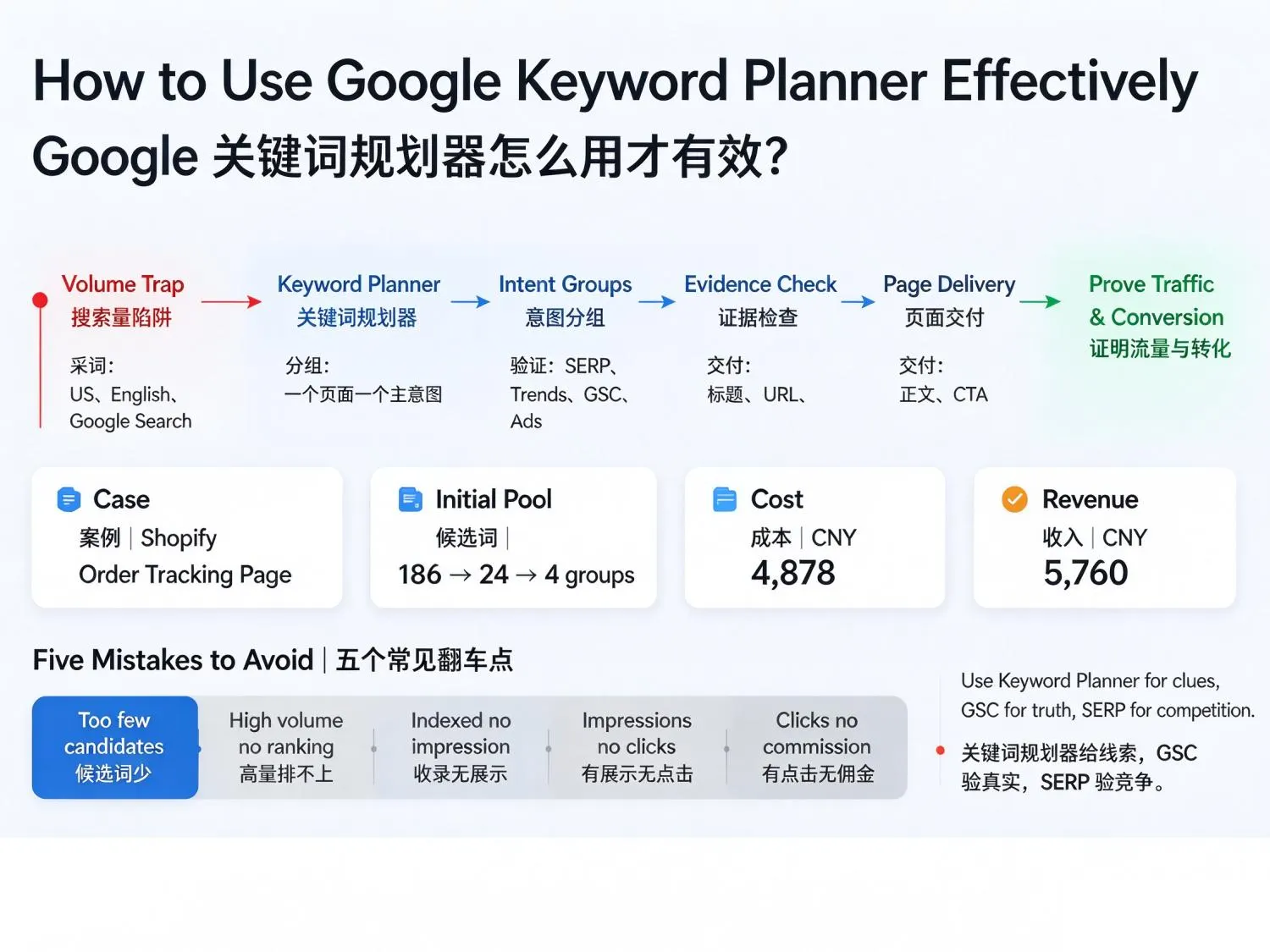
- Seed words: First enter “shopify order tracking page”, “shopify order status page” and “add tracking page to shopify”. This export resulted in 186 candidates. After deduplication and mismatched intentions, 24 candidates were left, and they were divided into 4 groups according to their intentions.
- Understand the indicators:Avg. monthly searches is Google’s range estimate; Competition reflects paid advertising competition, not SEO difficulty; Top of page bid is only a reference for advertising bids, not profit.
My internal initial screening criteria are that the monthly search volume is no less than 100, the advertising bid reference is no less than $1, and then the intent is manually checked. They are only project thresholds, not Google's official standards; long-tail industries can lower the lower limit of search volume to 30.
Step 2: Group by intention after word expansion
Word expansion is not to mechanically spell "best, top, cheap", but to complete the words used by users to express problems: implementation, custom, without app, template, customer order status. Then the candidate words were divided into four groups: merchants’ own construction, customer inquiry orders, tool comparison, and free templates.
This site only serves merchants, so the first group is retained, and customer inquiries and free templates are placed on separate pages to avoid answering the three questions of installation, after-sales and downloading in one "Order Inquiry" at the same time. During execution, unmatched words such as free, jobs, customer service, etc. are deleted, and then the four columns of "query word-intent-page-decision" are used to remove duplicates. A page only addresses one main intent, which is the basis for subsequent rankings and conversions.
Step 3: Use four sets of evidence to verify, don’t just look at search volume
- Manually check the SERP: Check whether the top ten items belong to official documentation, application lists, tutorials or forums. If official documents occupy the top three, write supplementary content such as "installation, permissions, privacy, and testing" instead of writing a general guide that claims to replace official documents.
- Google Trends: Compare up to 5 words at a time, select the country as the United States, and the time as the past 12 months. The trend value is a relative index from 0 to 100. The five numbers cannot be added together, nor can they be mixed with the monthly search volume of Keyword Planner.
- Search Console:Performance → Queries, filter specific query terms, and then check "Precise". The old site uses real clicks and displays for verification; the new site has no data, so treat it as a hypothesis to be verified.
- Ad Optional Test: Run Exact and Phrase only, disable Broad, $5/day for 7 days, total $35. Record the actual CPC, click-through rate and inquiry. Do not go directly to the ad group just because there are keyword clicks.
How to save and draw data
Merge Keyword Planner CSV and Search Console exports by lowercase query terms, preserving country, crawl date, search volume, CPC, SERP type, owned impressions, and decisions. When comparing topic selection, use a horizontal bar chart to display the display volume of the top ten query terms. Mark the number directly at the end of the column and write down the time range; do not use a pie chart, and do not make a dual-axis chart for the sake of "advanced". Search Console is responsible for real site data, and Keyword Planner is only responsible for external demand assumptions.
Step 4: Turn keywords into deliverable pages
The final page title is "How to Add a Shopify Order Tracking Page: App vs. Custom Code" and the URL is kept short and semantic. The main text talks about the default order status page, third-party applications, custom implementation, customer privacy, order number verification and online testing in sequence, and also includes screenshots of your own store demonstration. Only put the application comparison link in the CTA at the end of the page and indicate the alliance relationship. Don’t let the entire article just look like an advertisement.
Two tool routes, don’t buy the most expensive one at the beginning
- Free route: Keyword Planner + Trends + Search Console, the cost is 0, suitable for personal sites and small sites. The disadvantage is that there is no SEO difficulty, keyword gaps, and full SERP history, and the top ten must be checked manually.
- Paid route: Keyword Planner plus Semrush. The public price of Semrush Standard is about US$129.95 per month, or about US$389.85 for three months, which is about 2,807 yuan based on 1 US dollar to 7.2 yuan; you still need to check promotions and taxes when purchasing. It is suitable for multi-site teams and can see keyword difficulty, competitive product gaps and SERP snapshots, but the database has sampling and update delays, and ultimately Search Console still prevails.
Calculate costs and benefits clearly
Twelve pieces of content are used as a round: the domain name is calculated as 78 yuan according to my current bill, Cloudflare Pages, GitHub Pages, Figma and free tools are 0 yuan, and the labor is 4,800 yuan based on 4 hours per article and 100 yuan per hour. The investment in the first three months is 4,878 yuan. Shopify Affiliate offers up to $200 for the first order that meets the rules. The calculation formula is: Organic visits × Affiliate link click rate × Referral conversion rate × $200. Based on a 1% click rate, 8% conversion rate and 7.2 exchange rate, assuming that 500, 1,500, and 3,000 effective visits are obtained in three months, the estimated revenue is 5,760 yuan. These are conservative calculation assumptions, not industry statistics.
Under this set of assumptions, the book balance is about 882 yuan; if Semrush is purchased for another three months, the balance will become about minus 1,925 yuan. It’s not that you can’t buy tools, but you must first prove that the traffic and conversion paths are established.
Five common rollover points
- There are few candidate words: Check the region, language and Search Network; then change the seed to a phrase and use "related keywords" to expand the word.
- High search volume but not ranked:Revisit the top ten page types, and do long-tail, actual measurement or tool comparison instead. Do not compare word count with official documents.
- Included but not displayed: Use GSC URL Inspection to check sitemap, canonical, robots and in-site links. Do not use site: query as included statistics.
- Impressions but no clicks: Check whether the title accurately expresses the task, whether the summary gives results, and check the query and page intent.
- Clicks, no commissions: Use GA4 or Plausible to record affiliate outbound clicks, and then check affiliate qualifications, disclosure methods, and attribution windows.
The keyword planner is responsible for giving leads, Search Console is responsible for verifying real results, and SERP is responsible for verifying competition; first prove that the page can do it, and then go after the hot words.